
Quick Start
-
Download Aivi from the App Store.
-
Get your credentials. Open the app, go to the Settings tab, and sign in with your Apple account. From here, you will need to subscribe to a plan to unlock API access.
-
Create your first activity. Navigate to the Activities tab, then create a new activity. Choose the Progress template, pick a name and a unique ID (or slug) for it, like
dishwasheror3dprinter. The device you create the activity on is automatically set to Show on this device, so it will receive updates right away. -
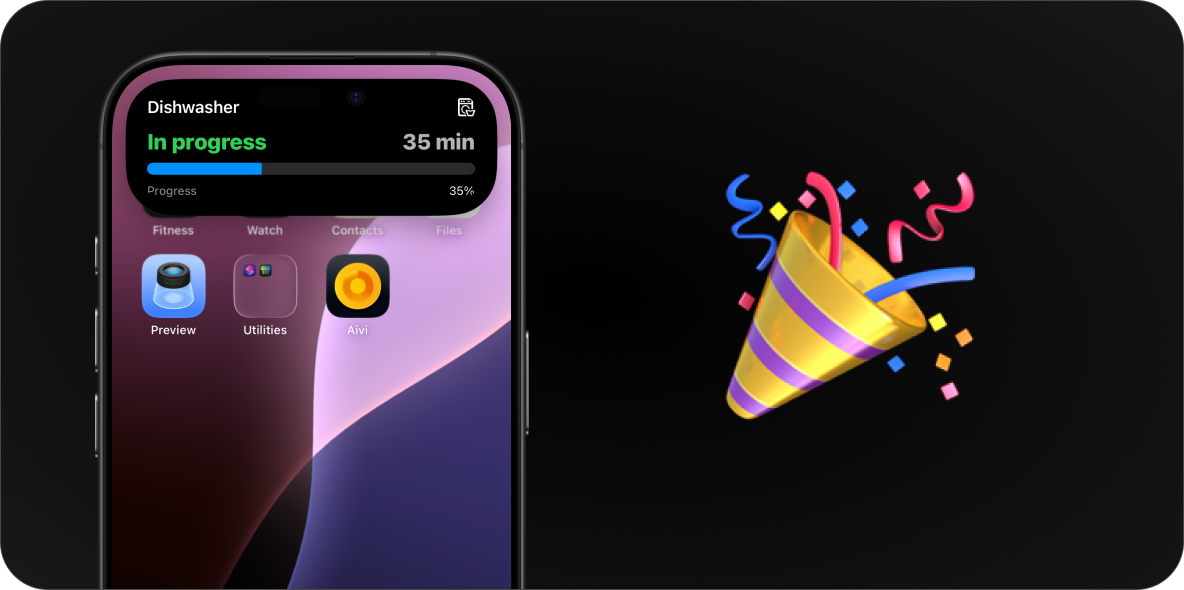
Send your first update. Use the API token from step 2 and the activity slug from step 3. The activity’s detail screen has a copyable version of this command to get you started; here is an example using curl:
curl \https://api.getaivi.app/activity/[slug] \-X PATCH \-H "Content-Type: application/json" \-H 'Authorization: Token [token]' \--data-binary @- << 'EOF'{"state": "ONGOING","content": {"template": "progress","icon": "washer","progress": {"style": "simple","value": 0.35},"header_left": {"value": "In progress","text_color": "green"},"header_right": {"value": "35 min"},"footer_left": {"value": "Progress"},"footer_right": {"value": "35%"}}}EOF -
You should now see a Live Activity on your device.
Updating the activity
Section titled “Updating the activity”As the task progresses, send the same request again with new values, for example a
higher progress value or different header text. The activity updates in place on
every subscribed device; you never create a second one.
Ending the activity
Section titled “Ending the activity”When the task is done, end the activity by sending state: "IDLE". The same
content you last sent is fine:
curl \ https://api.getaivi.app/activity/[slug] \ -X PATCH \ -H "Content-Type: application/json" \ -H 'Authorization: Token [token]' \ --data-binary @- << 'EOF'{ "state": "IDLE", "content": { "template": "progress", "progress": { "style": "simple", "value": 1.0 } }}EOFThe Live Activity then dismisses after the per-activity delay you configure in the app. See Activity states.
Widgets: the always-on layer
Section titled “Widgets: the always-on layer”Activities end; widgets stay. To keep state permanently on your Home Screen or
Lock Screen, create a widget in the app’s Widgets tab and update it the
same way: a PATCH to /widget/[slug] with a content payload and no
lifecycle state:
curl \ https://api.getaivi.app/widget/[slug] \ -X PATCH \ -H "Content-Type: application/json" \ -H 'Authorization: Token [token]' \ --data-binary @- << 'EOF'{ "content": { "template": "status", "value": { "value": "21°" }, "state": { "value": "Comfortable", "text_color": "green" }, "icon": "thermometer.medium" }}EOFSee the widget templates for all ten layouts, and the freshness model for how updates reach the widget.
Next steps
Section titled “Next steps”- Customize what your activity shows with the templates.
- Put persistent state on your screens with the widget templates.
- Browse the use cases for ready-made examples and payloads.
- Connect your smart home with the Home Assistant guide.
- See the API reference for the full request format, states, and errors.